
Last updated on
Nov 7, 2026

Canada OREA Form 410 2006-2026 free printable template
We are not affiliated with any brand or entity on this form

Fill out
Complete the form online in a simple drag-and-drop editor.

eSign
Add your legally binding signature or send the form for signing.

Share
Share the form via a link, letting anyone fill it out from any device.

Export
Download, print, email, or move the form to your cloud storage.
Why pdfFiller is the best tool for your documents and forms


End-to-end document management
From editing and signing to collaboration and tracking, pdfFiller has everything you need to get your documents done quickly and efficiently.
Accessible from anywhere
pdfFiller is fully cloud-based. This means you can edit, sign, and share documents from anywhere using your computer, smartphone, or tablet.
Secure and compliant
pdfFiller lets you securely manage documents following global laws like ESIGN, CCPA, and GDPR. It's also HIPAA and SOC 2 compliant.
What is Canada OREA Form 410
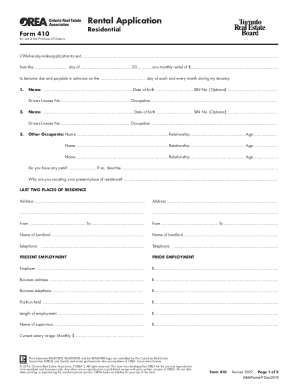
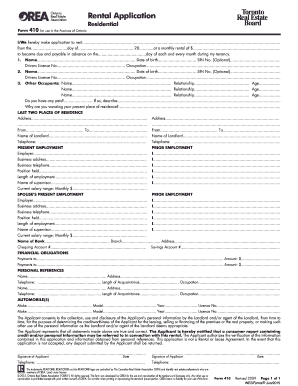
The Rental Application Form 410 is a document used by individuals seeking to rent residential properties in Ontario to provide personal and financial information for the rental assessment.
pdfFiller scores top ratings on review platforms




Who needs Canada OREA Form 410?
Explore how professionals across industries use pdfFiller.

Canada OREA Form 410 is needed by:
-
Prospective tenants looking to rent residential properties in Ontario.
-
Landlords managing rental properties in Ontario.
-
Real estate agents facilitating rental agreements for clients.
-
Housing authorities requiring rental applications for approval.
-
Property management companies processing rental applications.
Comprehensive Guide to Canada OREA Form 410
What is the Rental Application Form 410?
The Rental Application Form 410 serves as an essential document in Ontario's real estate market. This form is pivotal for individuals applying to rent residential properties, streamlining the application process for both tenants and landlords. Unlike rental or lease agreements, which outline the terms and conditions of a lease, the Rental Application Form 410 focuses solely on gathering information about the applicant.
A crucial aspect of this form is the applicant's signature, which signifies consent for the collection and use of personal information during the rental process. This consent is vital for landlords, as it enables them to assess the applicant's creditworthiness with assurance.
Purpose and Benefits of the Rental Application Form 410
The primary purpose of the Rental Application Form 410 is to facilitate a structured approach to applying for rental properties. This organized collection of information simplifies the evaluation process for landlords, enhancing overall efficiency. Both tenants and landlords can derive numerous benefits from using the form, including:
-
Streamlined information gathering for easier evaluation
-
Enhanced organization of personal and financial details
-
Increased assurance regarding data security when handling sensitive information
Key Features of the Rental Application Form 410
The Rental Application Form 410 is designed to be user-friendly, featuring essential sections that guide applicants through the submission process. Key areas included in the form are as follows:
-
Personal information such as name and date of birth
-
Employment details to assess financial stability
-
Fillable fields and checkboxes to streamline completion
Instructions within the form assist users in correctly filling out each required field, further promoting clarity and efficiency.
Who Needs to Use the Rental Application Form 410?
The target audience for the Rental Application Form 410 includes individuals seeking to rent residential properties in Ontario. Prospective tenants are required to complete this form to provide valuable information to landlords or property managers, ensuring they meet tenant requirements for rental agreements.
Landlords and property managers typically require this document from all applicants to facilitate a comprehensive evaluation of potential tenants.
How to Fill Out the Rental Application Form 410 Online (Step-by-Step)
Filling out the Rental Application Form 410 online is straightforward when using pdfFiller. Follow these steps to ensure your application is completed correctly:
-
Access the form through pdfFiller's platform.
-
Begin by entering your personal information in the designated fields.
-
Carefully answer financial questions to provide a complete overview.
-
Review all entries for accuracy and completeness before finalizing the application.
Common Errors and How to Avoid Them
Applicants often make several common mistakes when completing the Rental Application Form 410. These errors can lead to delays or disqualifications. To mitigate such issues, consider the following tips:
-
Double-check all personal information for accuracy.
-
Ensure compliance with submission guidelines as outlined in the form.
-
Review the entire application thoroughly before submission.
Submission Process for the Rental Application Form 410
Once the Rental Application Form 410 is completed, the submission process involves several options. Applicants can submit their forms through various methods:
-
Directly to landlords or property managers via email or in-person.
-
Utilizing online platforms for seamless submission.
Be mindful of any fees, deadlines, and processing times that may apply to the submission process.
What Happens After You Submit the Rental Application Form 410
After submitting the Rental Application Form 410, applicants can expect a follow-up process that includes communication from landlords or property managers. It’s essential to understand what happens next:
-
Anticipate a waiting period for approval or denial of your application.
-
Track your application status through any provided communication channels.
-
Be prepared for possible outcomes, including acceptance, rejection, or requests for additional information.
Sample or Example of a Completed Rental Application Form 410
Reviewing a completed Rental Application Form 410 can significantly aid in understanding how to fill out the document correctly. This visual representation illustrates how to provide information effectively.
It's recommended to examine a sample before starting your own application to ensure familiarity with the required fields and prompts.
Get Started with pdfFiller for Your Rental Application Form 410
pdfFiller simplifies the process of filling out and managing the Rental Application Form 410. The platform provides a secure environment for handling personal documents, ensuring your information is protected.
Take advantage of pdfFiller's resources to ensure a smooth and efficient application process.
How to fill out the Canada OREA Form 410
-
1.To access the Rental Application Form 410 on pdfFiller, visit their website and search for 'Rental Application Form 410'. Click on the relevant link to open the form.
-
2.Once the form is open, familiarize yourself with the layout. You’ll see various fields that require your personal and financial details.
-
3.Before starting the form, gather necessary information including your name, date of birth, Social Insurance Number (SIN), employment details, financial obligations, and personal references.
-
4.Using pdfFiller's interface, click on each blank field to enter your information. Input your details such as your full name and employment status in the designated areas. Utilize the checkboxes for any applicable options.
-
5.Continue completing the form by filling out each section. Make sure to review the instructions provided for any specific requirements.
-
6.Once all fields are completed, review your entries to ensure accuracy. Check for any missing information and correct any mistakes before finalizing.
-
7.After reviewing the form, you can save your progress. Click on the 'Save' option to keep your form for future access or download it to your device if you prefer.
-
8.To submit the form, follow the necessary submission guidelines as directed by the landlord or property management company. You may either download and print the completed form or submit it electronically if applicable.

What are the eligibility requirements for the Rental Application Form 410?
You must be an individual seeking to rent a residential property in Ontario. Eligibility often includes providing accurate personal and financial information, as well as consent for a creditworthiness assessment.
Is there a deadline for submitting the Rental Application Form 410?
While specific deadlines may vary by landlord or property management company, it is generally recommended to submit your form as soon as possible to increase your chances of securing the rental property.
How do I submit the completed form?
You can submit the Rental Application Form 410 either electronically through pdfFiller or print it out and hand-deliver or mail it to the landlord or property management company, depending on their submission preferences.
What documents do I need to fill out the Rental Application Form 410?
Before completing the form, ensure you have your identification (such as a driver’s license), your Social Insurance Number (SIN), proof of income (like pay stubs), and any personal references ready.
What common mistakes should I avoid when filling out the form?
Common mistakes include leaving fields blank, providing inaccurate information, and failing to sign the form. Always double-check your entries to ensure data accuracy.
How long will it take to process my application once submitted?
Processing times for rental applications can vary widely, but it generally takes several days to a couple of weeks. It's advisable to follow up with the landlord or property manager for specific timelines.
Can I save my Rental Application Form 410 before submitting it?
Yes, when using pdfFiller, you can save your progress at any time, allowing you to return to complete and submit your Rental Application Form 410 at a later date.
Canada OREA Form 410 Form Versions
Related Content
Related Forms





Get the latest insights from our blog


If you believe that this page should be taken down, please follow our DMCA take down process
here
.
This form may include fields for payment information. Data entered in these fields is not covered by PCI DSS compliance.